
Not all errors are apparent when moderating a website. Soft 404 errors are one such difficult issue. These, unlike standard errors, can quietly destroy your website performance without leaving clear warning signs.
Let’s discuss this into simple terms so you can quickly recognize, fix and prevent these errors.
What is a Soft 404 Error?
This is when a webpage looks like “not found” page for users but the server does not return a proper status code of HTTP (404). but instead of returning a proper 404 status code, it sends a 200 (OK) response to search engines.
So if you clicked a link and were shown a blank page or a “No content available” message, technically, the page still exists but does not display any content. This disparity creates a soft 404.
Such issues are commonly flagged by a tool like Google Search Console, as they affect the way in which search engines make sense of your website. That’s why it’s also important to understand how to fix indexing issues in Google Search Console, as both problems are closely connected and can impact your overall SEO performance.
404 vs Soft 404 Errors: What’s the Difference?
Here’s where the difference is a key to solving it well:
- Standard 404 Error
- Server indicates that page does not exist
- Returns correct HTTP status code (404)
- Assists search engines to remove the page from index
- Soft 404 Error
- The page appears to be empty, you are irrelevant to it, broken
- return 200 (ok) instead of 404
- Wastes crawl budget and confuses web crawlers
In short:
A proper 404 is forthright, while a soft 404 is misleading.
Common Causes of Soft 404 Errors
Soft 404 errors don’t just appear randomly, they typically occur due to small technical or content-related issues.
1. Thin or Empty Content
Search engines determine that the page is useless, soft 404s are people with pages Search engines treat them as low-value or non-existent.
2. Broken or Invalid URLs
Broken or Invalid URLs, wrong links or old URLs lead to pages that are not loading completely and thus lead to an invalid page response.
3. Improper Redirects
Redirecting all deleted pages to the homepage instead of redirecting users to a relevant page can confuse search engines
4. Faulty CMS or Website Setup
Faulty CMS or Website Setup. It happens that your CMS generates pages that are without content, which leads to soft errors.
5. Missing Error Page Configuration
Missing Error Page Configuration. If you do not set up your 404 page properly, your website can end up showing a normal page instead of a proper error.
Why Soft 404 Errors Are Harmful
Soft 404 errors might seem harmless, but they can silently damage your SEO efforts.
- Waste search engine crawl budget
- Reduce your website’s ranking potential
- Create a poor user experience
- Prevent important pages from being indexed
This is why businesses investing in Affordable SEO Services always prioritize fixing these errors early.
How to Troubleshoot Soft Error Issues
Now, let’s discuss practical steps to fix soft error issues on your site.
1. Fix or Remove Low-Quality Pages
If a page contains no helpful content, enhance it or delete it entirely.
2. Return the Correct Status Code
Ensure that non-existing pages return a proper 404 or 410 status instead of 200.
3. Repair Broken URLs
Regularly check your website for broken URLs and outdated links, then repair them.
4. Use Relevant Redirects
Only redirect the user to related pages, not “random” ones like the homepage.
5. Optimize Server Responses
This will ensure that your server handles this appropriately and search engines do not misread pages.
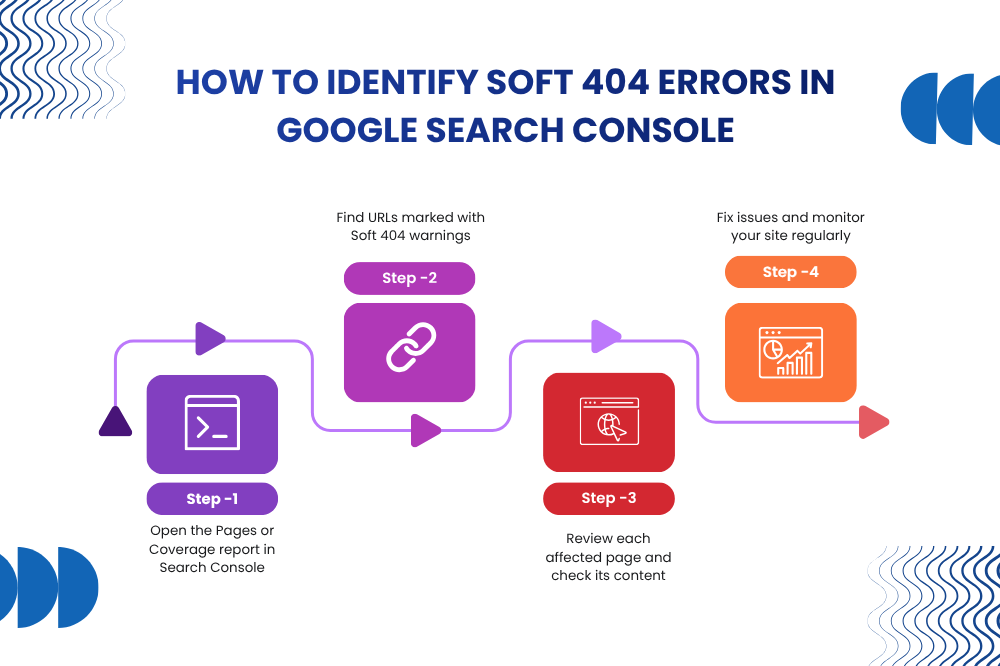
How to Identify Soft 404 Errors
Soft 404 errors are easy to identify, using tools like Google Search Console:
- Open the Pages or Coverage report
- Look for “Soft 404” warnings
- Review affected URLs
- Take corrective actions
Regular monitoring helps keep your site clean and search-friendly.
Prevention Tips for Soft 404 Errors
It is always better to prevent than to correct it afterward. Here’s how to get ahead:
- Create Valuable Content
- Maintain URL Structure
- Configure Error Pages Properly
- Perform Regular Audits
- Work with Experts
No filler pages, each page should provide some kind of value.
Keep URLs clean, updated, and properly linked.
Always setup 404 page with appropriate status and good navigation.
Frequent SEO audits help detect and fix issues early.
A reliable website designing company in noida partners with you to reduce technical errors right from the beginning.
Bonus Tip: Internal Linking Matters
As you address technical problems, don’t neglect to work on internal SEO optimization. So, if you’re facing problems like indexing issues, check out Next Blog Link – noindex tag error to understand how tags affect your visibility.
Final Thoughts
Soft 404 errors are one of the hidden SEO killers that no one sees, but they impact your website’s growth. They don’t always break your site—but they confuse search engines, which is just as harmful.
So, you can keep your website healthy and well-maintained if you know exactly what caused it to get broken in the first place, fix it properly, and add preventative measures. The thing is to keep your immaculate site, whether you do SEO all alone or take Affordable SEO Services.
At Digital Upward, we consider these technical elements when performing SEO for our clients to ensure we are providing optimal results. From simple soft 404 errors to complicated fixes, all our methods aim at long-term growth.
This is a desire for every business, as a well-performing website will rank higher while also bringing more convenience to the visitors.
 Soft 404 Errors: Causes, Fixes, and Prevention
 Discovered – Currently Not Indexed: Understanding and Resolving
 Crawled – Currently Not Indexed: What It Means & How to Resolve It
 Page Not Indexed: Common Causes and Solutions
 How to Fix Indexing Issues in Google Search Console