It would be an exciting endeavor, not an intimidating one, to start a website in 2026. There are so many Website builders competing for your attention, each claiming it to be the easiest and most powerful, but how do you choose among them? The wrong choice may result in waste of time, money loss, and endless frustration. The right choice? It becomes the cornerstone of your online success.
Before deciding upon a particular platform, however, take a moment and answer these seven crucial questions. They could save you from expensive errors and point you in the right direction for a builder that exactly suits your needs.
What is the true purpose of your site?
While this sounds obvious, it is actually the first step and one that many people skip. Do you want a simple portfolio to show off your photography? Want to sell products online? Are you a food blogger ready to get your latest recipes on the web? Or perhaps it’s a business site for consulting.
Depending on what sort of website you want, the builder you choose will be quite different in nature. A platform that is perfect for bloggers could be awful for online stores. What works really well as a portfolio might lack features that a business website needs.
If you want to set up an online store, you need strong features instead of flash. Your partner e-commerce development company would normally provide you with all the necessary features like inventory management, payment gateways, shipping calculators and product variations. Here builders like Shopify and WooCommerce excel at. But if you’re making a simple five-page business website, you’ll be paying for features you never use.
Think ahead too. Do you think you might end up adding a blog later? Is there any chance you might start selling digital products next year? Choose a platform that will grow with your plans without making you start over from scratch again.
How Much Control Do You Really Need?
Website builders are a scale that ranges from one extreme to the other. On the one end you have drag and drop platforms, where all you have to do is click, drag and drop your site elements at the correct place without any coding needed. And then there’s the other end of these online website design platforms, which offer great customizability where you can tweak each pixel to your heart’s desire but you might have to touch some code.
Just be honest about your own technical comfort level. Don’t pick a platform that demands HTML if you don’t know much about it; no matter how powerful it claims to be. You’ll end up frustrated and immobilized.
But then what if you like to explore and really need complete creative freedom? A simple drag-and-drop builder could feel constraining to you. You’ll need something that allows you to look under the hood and make high-level adjustments.
For most people, the middle ground is best. Choose a platform that handles all the technical heavy lifting and yet still enables you to customize colors, fonts, layout and functions without having to type out any complicated code.
What is the true cost beyond the monthly fee?
This is where many folks are surprised. A $10 per month advertised price rarely tells the complete story. Smart shoppers look at the total.
Start with the basics. Does the price include a custom domain name, or are you stuck with “yourname.websitebuilder.com”? Professional businesses must have their domain. Some builders provide this for free in the first year, while others charge from day one.
The amount of email addresses you can use is also important. Contact@yourbusiness.com looks much better than a generic Gmail account. Some affordable website builders offer this bundled in, but charge separately or don’t offer it at all.
What about those sneaky add-ons? Want the builder’s branded footer removed from your site? That’s often a premium feature. Have to sell more than five products? You must pay for an upgrade. Want advanced analytics or priority customer support? Cost will be added.
Transaction fees is another factor that online sellers must consider. Some platforms add a percentage of every sale onto the monthly subscription fee. Just a few of these small percentages can soon add up when you are making tens or hundreds of sales monthly.
Compute the true annual cost including domain and email, premium features, and transaction fees. Sometimes a better builder with all extras included comes out cheaper in the long run than a cheap builder offering just the basics but with endless plug-ins.
How will the site work on mobile?
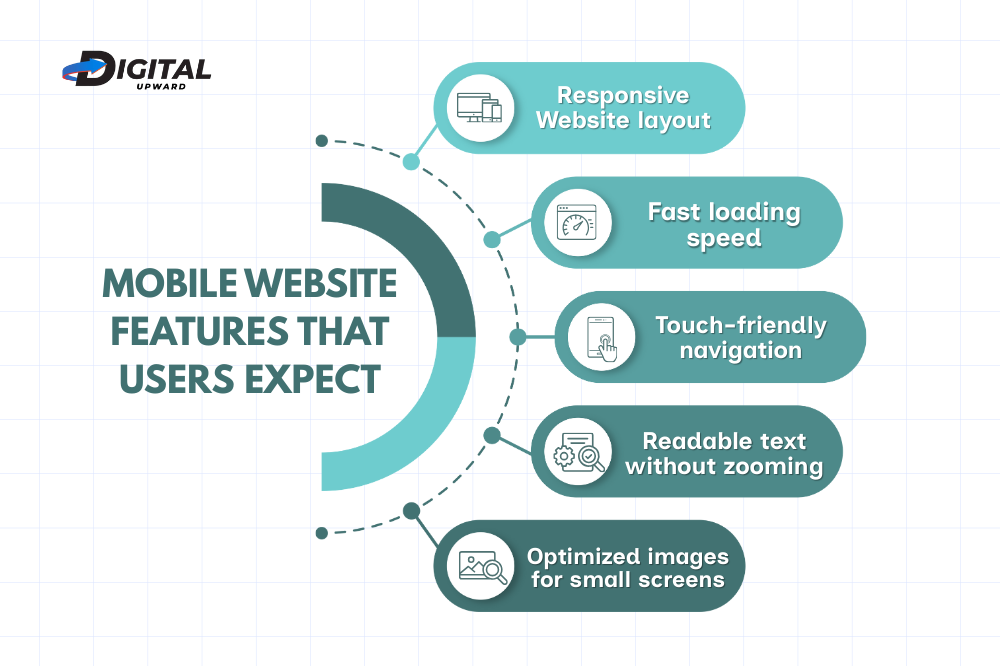
Here’s a fact that shapes every decision. Over 65% of web traffic now comes from smart phones and tablets. If a website looks bad or loads slowly for people using mobiles, then literally two-thirds of your possible visitors will leave without even reaching your content.
Every modern website builder now says it’s “mobile-friendly”, but what does that mean in fact? The best platforms are truly responsive in design. Your site will look great on any size screen from the biggest desktop monitor down to the smallest mobile phone.
Check before you commit to a service. Most of the top website building platforms give free trials. Build a trial page and open it on your phone. Does it look as good as it did on your PC? Can buttons be tapped easily? Is the text readable without zooming? Do images resize properly or be cut off for anything important?
Mobile speed is immensely important, since downloads from smart-phones can be tortoise-slow. A site that takes five seconds to load loses about half of its visitors before they even get to see your content. Look for reviews which mention specifically speed and loading times on mobiles.
What Happens If You Outgrow This Platform?
No one wants to fail, but most people will fail due to lack of planning. Nowadays you might need a simple website. But what about two years from now when your company has tripled its team size?
Would you be able to move your content if you switch to another platform? Some homepages make you live inside them, i.e., if you have a blog or photos or pages, they all live on their platform. To move means build again from scratch. Others can assist you in exporting your data in an organized manner, and this will make it easier to move your site to another platform or work with one of those top web development firm faster.
Scalability is also an important factor. Can the platform support a sharp increase in visitor numbers when your site goes viral or do you do well at promotion? Some homepages collapse under these conditions, and this is the very moment when you want them to work best.
Look at the product upgrade path, too. If you start using the basic service, what are the higher level packages like? Do the advanced features start to make some sense now or never? Or does the product do everything up to a certain point but then shut down on you?
What Kind of Support Will You Get When Things Go Wrong?
At two in the morning, when your website suddenly breaks or you can’t figure out how to change a crucial thing, how quickly can help arrive? Service quality varies widely from vendor to vendor.
Some companies provide 24-hour email assistance or phone help hotlines. Others serve up only email communication which takes days to respond to. Quite a few keep their best customer care services for higher-grade customers, leaving basic users nothing more than community forums and manuals.
During the trial period, test their customer support. Ask a simple question or anything at all and attempt to gauge how quickly they react and how much useful information they give in return. Read through the help documentation. Is it well-written, easily searchable? Does the company make video tutorials to demonstrate common tasks?
Community forums are a good place to check too. Online communities that discuss help between users can be priceless. Often you will find better solutions to specific problems from someone who had experienced the same trouble last week.
Does It Play Well with Other Tools You Need?
Your site never operates in isolation. Most likely, it will work with other services like email marketing tools, accounting software, social media platforms, analytics, customer relationship management systems, and much more.
The best website builder for small businesses must integrate smoothly with the tools you use now or plan to use. Otherwise, you will find yourself wasting hours on adding manual data or outlying cash for expensive custom integrations.
Start making a list of the integrations that are essential and you really want to have before you go shopping. Do you need to link up with Mailchimp for email marketing? Want Google Analytics detailed analysis data to keep track of visits on the internet? Are you thinking about using Instagram as a way to push people towards your site? Make sure that your chosen builder, native or via straightforward plugins, supports this sort of connection.
If you’re selling anything, pay special attention to payment gateways. Does the platform work with PayPal, Stripe or whatever other payment method your customers prefer? Are additional charges levied for these integrations?
Some platforms come with wide-ranging app marketplaces that provide thousands of third-party integrations. Others keep things simple, providing only a few essential tools. Neither approach is wrong, just make sure that your platform fulfills all your needs.
In the end, choosing the right website builder isn’t about finding the “best” platform, it’s about finding what’s best for YOU. The right choice depends on your mix of talents, goals, budget and future plans.
Conclusion
Don’t rush into a decision to get a limited-time discount. A platform that’s half price but doesn’t suit your needs is more expensive than one at full price that provide remarkable services for many years.
If all the above information still leave you confused or overwhelmed, then let professionals take a look at your unique needs and recommend the perfect solution. There are businesses like Digital Upward that focus on this area, where they will deal with all the technical part, so you can keep your entire focus on running your business snmoothly. Whether you choose to hire a website builder or go with professionals, by asking these seven questions, you can ensure that you move forward confidently towards creating a website that serves your real needs.
 Discovered – Currently Not Indexed: Understanding and Resolving
 Crawled – Currently Not Indexed: What It Means & How to Resolve It
 Page Not Indexed: Common Causes and Solutions
 How to Fix Indexing Issues in Google Search Console
 Keyword Research Hacks: Find Keywords Your Competitors Missed